Top 30 Cloud Security Tips for 2026 You Must Know
Cloud computing offers incredible scalability and flexibility, but it also opens up new security challenges that can catch organizations off guard. As more data and services move to the cloud, defending against cloud-specific threats becomes critical. In this environment, understanding common cloud security risks and putting strong defenses in place is essential.
Table of Contents
The following sections outline the key risks to be aware of and then dive into 30 cloud security tips to help you secure your cloud infrastructure and data in 2026 and beyond.
Cloud Security Risks and Challenges
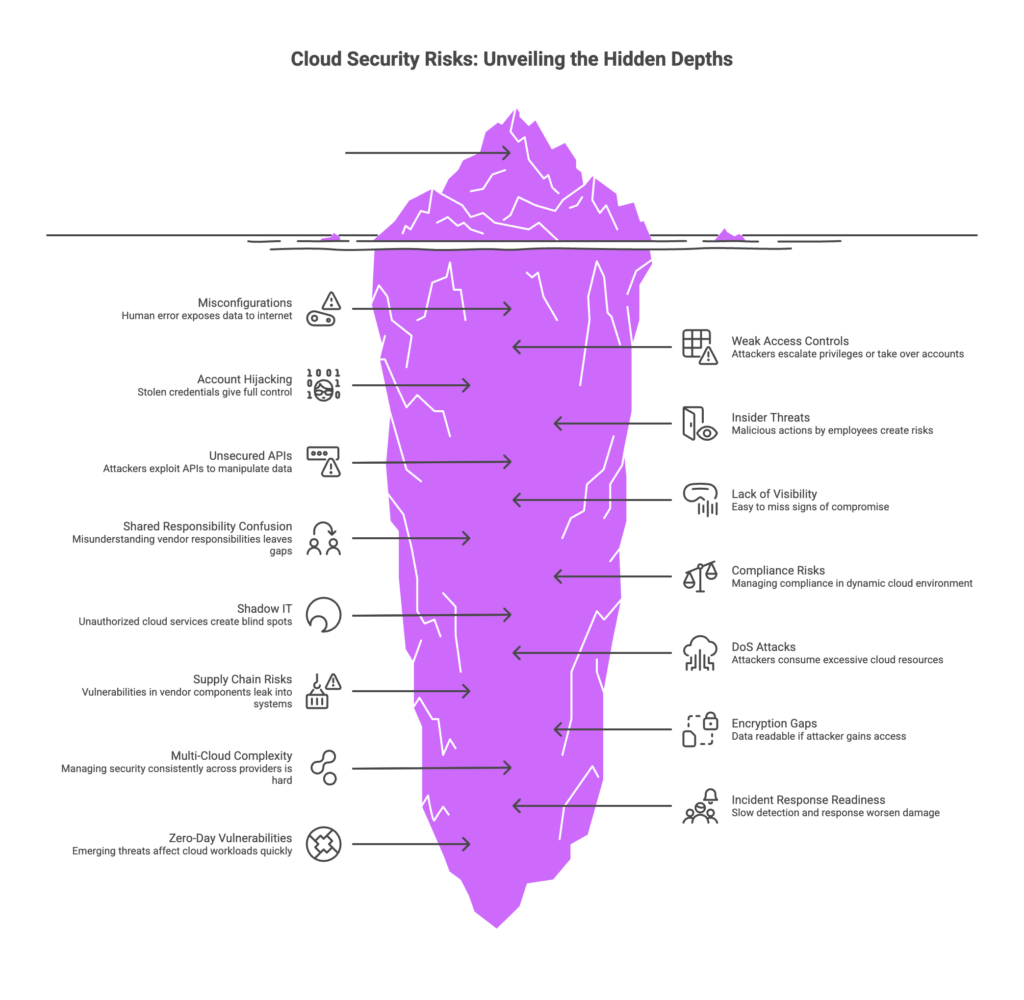
Cloud environments introduce unique risks that organizations must manage proactively. It’s not enough to rely solely on the cloud provider’s defenses – you must also lock down your side of the shared model. Some of the most common cloud security challenges include:
- Data Breaches and Exfiltration – Attackers may target sensitive data stored in cloud databases or storage. If improperly secured, cloud data (PII, intellectual property, customer records) can be stolen or leaked, leading to severe business and compliance consequences.
- Misconfigurations – One of the biggest risk factors is simple human error: accidentally leaving storage buckets or databases open, using weak access rules, or deploying insecure default settings. Misconfigurations can immediately expose data or services to the public internet.
- Weak Identity and Access Controls – Poor management of user accounts and permissions can allow attackers to escalate privileges or take over accounts. For example, using the same password everywhere, not enforcing multi-factor authentication (MFA), or giving blanket permissions to administrators can all backfire.
- Account Hijacking – Stolen credentials (through phishing or credential stuffing) or misused service accounts can give attackers full control of cloud resources. Without extra layers of security, a single compromised password can lead to a full takeover.
- Insider Threats – Malicious or careless actions by employees or contractors can create risks. An insider with too many privileges can leak data or disable security measures, so monitoring and separation of duties are important.
- Unsecured APIs and Interfaces – Cloud services expose APIs for automation and integration. If those APIs are not authenticated and encrypted properly, attackers can exploit them to manipulate or extract data.
- Lack of Visibility and Monitoring – In the cloud, you may have hundreds of virtual machines, containers, and serverless functions running. Without strong logging and centralized monitoring, it’s easy to miss signs of compromise or unusual activity.
- Shared Responsibility Confusion – Cloud providers secure the underlying hardware and network, but you must still secure your applications, data, configurations, and user access. Misunderstanding which responsibilities lie with you versus the vendor can leave dangerous gaps.
- Compliance and Regulatory Risks – Different data types (e.g. health records, credit card information) may be subject to GDPR, HIPAA, PCI-DSS, or other regulations. Managing compliance in a dynamic cloud environment requires extra care with data residency, encryption, and audit controls.
- Shadow IT – When employees use unauthorized cloud services without IT’s knowledge, it creates “blind spots.” Shadow IT applications may store corporate data outside sanctioned environments, bypassing security controls and increasing exposure.
- Denial of Service (DoS) Attacks – Although cloud platforms are resilient, attackers may launch DoS attacks on your cloud-hosted applications or try to consume excessive cloud resources, causing downtime or unexpected costs.
- Supply Chain and Third-Party Risks – Using third-party tools, libraries, or cloud services introduces risk. A vulnerability in a vendor’s component or a compromised software dependency can leak into your cloud systems if not managed.
- Encryption Gaps – Failing to encrypt data at rest or in transit can leave it readable if an attacker gains access. If encryption is not end-to-end, intermediate storage points may leak data.
- Complex Multi-Cloud/Hybrid Environments – Managing security consistently across multiple cloud providers (AWS, Azure, GCP, on-prem) is hard. Different tools and configurations can lead to inconsistent policies or unmonitored areas.
- Insufficient Incident Response Readiness – If a breach happens, slow detection and response can worsen the damage. Without a practiced incident response process tailored for cloud environments, teams may flounder during a real attack.
- New/Zero-Day Vulnerabilities – Cloud services continuously evolve, and zero-day exploits or emerging threats (AI-driven attacks, new malware) can affect cloud workloads quickly. Staying updated on threat intelligence is critical.
Understanding these risks is the first step. The next step is implementing a comprehensive set of security practices. Below are 30 practical cloud security tips covering access control, monitoring, incident response, data protection, and more. Following these best practices will help you strengthen your cloud security posture and prepare for the evolving threat landscape of 2026 and beyond.
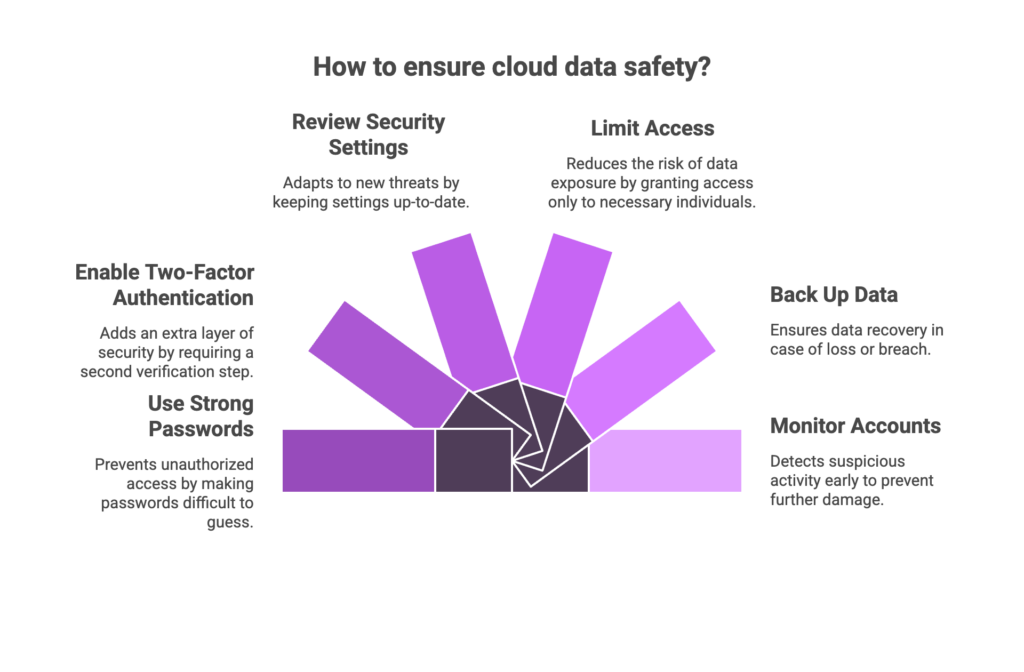
Top 30 Cloud Security Tips for 2026
1. Enforce Strong IAM and Multi-Factor Authentication
Identity and Access Management (IAM) is the foundation of cloud security. Always require multi-factor authentication (MFA) for every user and especially for any account with high privileges. MFA means using a second factor like a hardware token, smartphone authenticator app, or biometric scan in addition to a password. Hardware tokens (like FIDO security keys) or app-based authenticators are far more secure than SMS or email codes. Complement MFA with role-based access control (RBAC): assign users to roles that give them only the permissions they need. For example, a database administrator should not have access to the entire network.
Regularly audit all accounts and permissions to ensure the principle of least privilege is enforced. If a user or service no longer needs a permission, revoke it. Remove or disable any inactive accounts promptly. Use dedicated jump servers or Privileged Access Workstations (PAWs) for administration, and avoid storing plaintext passwords or credentials in code. By tightly controlling who can do what and requiring MFA, you dramatically reduce the attack surface and block common attacks like phishing or credential stuffing (part of Human Risk Management).
- Require MFA for all user and administrator logins (especially high-privileged accounts).
- Use strong authentication methods (hardware keys or authenticator apps) and disable weak methods (SMS).
- Implement role-based access control (RBAC) so users only have the minimum access required.
- Conduct regular access reviews to remove unused accounts and permissions.
2. Understand the Shared Responsibility Model
In the cloud, security is a shared responsibility between you and the cloud provider. Know exactly which parts of security the provider covers and which parts you must handle. For example, AWS, Azure, and Google Cloud secure the underlying physical infrastructure, hypervisors, and host OS. But you are responsible for securing your data, your virtual machines, your operating systems, applications, configurations, and network traffic within that environment. Misconfigurations often happen when teams assume the cloud provider “fixed” everything.
To avoid confusion, make the division of responsibilities explicit. Document which teams handle network security versus data encryption versus identity management, etc. Train your staff on provider-specific guidelines (e.g., AWS’s list of customer responsibilities). For example, a public storage bucket being open to the world is your responsibility, not the provider’s fault. By clarifying the shared responsibility model, every team will know which controls to focus on, eliminating blind spots that attackers exploit.
- Review your cloud provider’s security documentation to know exactly what they secure.
- Clearly document and communicate which security tasks your organization must manage.
- Train teams to check both cloud provider settings and internal configurations (don’t assume “the cloud did it”).
- Use provider-provided dashboards (like AWS Shared Responsibility Model pages) as reminders.
3. Foster a Security-First Culture with Ongoing Training
Phishing volume is surging again: Over 1.13 million phishing attacks were recorded worldwide in Q2 2025 – the highest quarterly total since 2023. (By comparison, Q4 2024 saw ~989,000 attacks after a peak of 1.62 million in early 2023.) — Phishing Attack Statistics
Technology alone cannot stop every attack. Employees and cloud users are your first line of defense, so foster a security-first mindset across the organization. This means regular training on cloud-specific threats and safe practices. Teach everyone – engineers, developers, IT staff, even business users – about common cloud attack techniques like phishing, credential theft, and social engineering. Simulated phishing campaigns help raise awareness.
Make security education continuous and relevant. For example, hold quarterly training sessions or lunch-and-learn workshops on topics like “how to spot a cloud phishing email” or “safe data-sharing practices in the cloud.” Update your training material with the latest threats (for instance, explain new trends like AI-powered phishing attempts). Clear policies should be established for data handling, third-party access, and incident reporting. Encourage a non-judgmental reporting environment so employees feel comfortable flagging suspicious events.
By combining technical controls with a vigilant staff, you strengthen your entire security posture. Remember: a well-trained team that knows to use MFA, recognize phishing links, and lock down data is much harder for attackers to fool.
- Conduct regular security awareness training focused on cloud topics (phishing, secure data sharing, password hygiene).
- Use simulated phishing and attack drills to keep employees sharp.
- Define clear cloud usage policies and ensure everyone understands them.
- Encourage reporting of suspicious activity without fear of blame.
4. Keep All Systems Patched and Up to Date
Unpatched software is one of the simplest ways attackers can infiltrate your cloud environment. Whether it’s the operating system on a virtual machine, a container base image, or a cloud-hosted database service, apply security updates promptly. Use automated patch management tools to regularly scan for missing patches and deploy fixes. Prioritize patches for high-severity vulnerabilities (CVSS) or ones known to be actively exploited.
Don’t forget that in the cloud you often have many moving parts: application code, third-party libraries, virtual network devices, serverless functions, and even managed services that require configuration updates. Create a disciplined patching schedule (for example, weekly or monthly patch windows) and stick to it. Test patches in a staging environment first if possible to avoid disruptions. In short, treat patching as a continuous process and not a one-time task.
- Enable automated patch scanning and updates for your cloud instances and services.
- Prioritize critical patches (especially for known exploitable vulnerabilities).
- Include all layers in patching: OS, middleware, application dependencies, and cloud-managed services.
- Verify that patch deployments succeed and monitor for any failures or rollback needs.
5. Deploy Data Loss Prevention (DLP) Tools
Protecting sensitive data is crucial in the cloud. Data Loss Prevention (DLP) tools help enforce policies about where data can move and who can access it. Configure DLP to monitor cloud storage, file transfers, email, and collaboration platforms for sensitive information (like PII, financial records, or trade secrets). If a user tries to upload confidential data to a public Dropbox or send an unencrypted file via email, DLP should flag or block it.
Modern DLP solutions integrate with cloud services to automatically identify sensitive data. For example, they can scan documents in cloud storage buckets or cloud-based email for patterns (SSNs, credit card numbers). They also enforce rules: you could block any sharing of a file labeled “Confidential” to external domains. By setting up DLP policies, you add a safety net that prevents accidental leaks and ensures compliance with data regulations even when data is in transit within or outside your cloud environment.
- Implement a cloud-aware DLP tool that can inspect files, emails, and data flows for sensitive content.
- Create policies to automatically block or quarantine risky actions (e.g., sending PII externally).
- Integrate DLP with collaboration apps (like SharePoint, Slack, Gmail) to monitor data in use.
- Regularly review and update DLP rules as data types or regulations change.
6. Develop and Test an Incident Response Plan
No security is perfect, so assume you will need to respond to incidents. Have a robust, well-documented incident response (IR) plan specifically for cloud environments. The plan should define roles and responsibilities (who does what when a breach is suspected), communication channels, and recovery steps. For cloud incidents, detail how to identify and isolate compromised workloads (e.g., isolating a compromised VM or serverless function), as well as how to restore from backups if needed.
Crucially, test your IR plan regularly. Conduct tabletop exercises or simulated breach drills in a controlled environment. These exercises help teams practice their roles, uncover weaknesses in the plan, and improve coordination. After any incident or drill, perform a post-mortem review to update the plan and patch any response gaps. In the fast-moving cloud world, the difference between a contained breach and a full-scale data disaster can be how quickly your team acts. A tested IR plan ensures everyone knows exactly what steps to take (and who to notify) when time is of the essence.
- Define clear incident response playbooks for common scenarios (data breach, account compromise, ransomware).
- Assign specific responsibilities (e.g., who isolates services, who handles legal/compliance notifications).
- Conduct regular drills and tabletop exercises simulating cloud incidents.
- Update and refine the response plan based on lessons learned from drills or real incidents.
7. Apply the Principle of Least Privilege (PoLP)
Granting too much access is a recipe for disaster. In the cloud, each user and service should have only the permissions they absolutely need—no more. This is the principle of least privilege. For example, a developer building a web application should not automatically have administrator-level access to the entire cloud environment. Instead, only grant them the roles needed for their job (perhaps just access to the development project workspace).
Enforce PoLP by creating granular roles and permissions in your IAM setup. Regularly audit all roles and policies to remove overly broad permissions. Eliminate unnecessary shared accounts or generic credentials. For machine-to-machine access (like service accounts or API keys), ensure those keys have limited scope and lifetime. Adopting a zero-trust mindset reinforces PoLP: treat every request as potentially malicious and require justification (or re-authentication) for sensitive actions.
- Regularly review user and service account permissions and remove any unused privileges.
- Segment roles so that no one account has permissions across multiple unrelated systems.
- Use temporary or expiring credentials (AWS STS, OAuth tokens) instead of long-lived keys where possible.
- Implement a cloud IAM policy that denies by default and only explicitly allows required actions.
8. Deploy CNAPP and Web Application Firewalls (WAFs)
Modern cloud environments benefit from specialized security platforms. A Cloud Native Application Protection Platform (CNAPP) unifies multiple security capabilities, such as vulnerability scanning, compliance monitoring, runtime protection, and threat intelligence, all designed for cloud workloads. Deploying a CNAPP can give you centralized visibility into all cloud assets (containers, serverless functions, VMs) and detect misconfigurations or vulnerabilities automatically.
Complement CNAPP with Web Application Firewalls (WAFs) to protect your cloud-hosted web applications. A WAF sits in front of your web traffic and filters out common attacks like SQL injection, cross-site scripting (XSS), and malformed requests. Many cloud providers offer managed WAF services that can be quickly enabled for your app endpoints. For API-centric workloads, ensure you have API gateways or WAF rules protecting those interfaces as well.
By using CNAPP tools and WAFs together, you create a strong defense for your cloud workloads at both the infrastructure and application layers. The CNAPP will help you catch risks before deployment, and the WAF will guard in real time against attacks trying to exploit application vulnerabilities.
- Use a CNAPP or equivalent security platform for unified vulnerability scanning and runtime protection of cloud workloads.
- Enable a Web Application Firewall (WAF) for any public cloud apps or APIs (to block OWASP Top 10 threats like XSS/SQLi).
- Regularly update WAF rules and signatures to cover new attack patterns.
- Integrate CNAPP and WAF logs with your monitoring system for centralized alerts.
9. Leverage SIEM and Embed Security into Your Development Lifecycle
Visibility and proactive security go hand-in-hand. Aggregate logs and events from all cloud components into a central SIEM (Security Information and Event Management) system. A SIEM can correlate unusual patterns—like multiple failed logins across accounts or spikes in network traffic—to alert you to emerging threats. In the cloud, make sure your SIEM collects logs from cloud services (trail logs, flow logs, Kubernetes audit logs, etc.) as well as your own servers.
At the same time, bake security into your development process. In a DevSecOps approach, shift security checks left into the Software Development Lifecycle (SDLC). Use static analysis tools (SAST) to scan code for vulnerabilities before deployment, and dynamic testing (DAST) on running services. Automate compliance checks and dependency scans in your CI/CD pipelines so that builds fail if a critical security issue is introduced. This way, you catch many problems before code ever reaches production. The combination of strong runtime monitoring (SIEM) and proactive DevSecOps practices helps you prevent and detect issues across the lifecycle of your cloud applications.
- Forward all relevant cloud and application logs to a centralized SIEM for real-time analysis.
- Integrate security scanning tools into your CI/CD pipelines (e.g., SAST for code, SCA for dependencies, DAST for running apps).
- Set up alerts in your SIEM for key indicators (e.g., unusual API calls, privilege escalations, or brute-force attempts).
- Ensure developers and operations teams collaborate on security issues identified during development or in logs.
10. Control Third-Party and Vendor Access
Third-party contractors, vendors, and managed service providers (MSPs) often need access to your cloud environment for maintenance or support. However, each external user is a potential entry point. Establish a vendor risk management program that treats third-party access carefully. Give vendors only the accounts and permissions they need, and nothing more. For instance, create separate user accounts for vendor personnel rather than sharing your own company credentials.
Within this program, conduct background checks if appropriate and verify that the vendor follows good security practices (encryption, secure development, etc.). Require vendors to use MFA and unique accounts. Keep all vendor activities logged and monitored. Furthermore, include specific security requirements in your contracts: outline how quickly the vendor must notify you of a breach or how they should handle incidents. By strictly controlling and auditing vendor access, you prevent a scenario where a compromised vendor account can be used to pivot into your cloud systems.
- Assign unique, least-privilege cloud accounts for every third-party or vendor.
- Enforce MFA and strict access hours/policies on vendor accounts.
- Monitor and log all vendor actions in the cloud.
- Include security terms in vendor agreements (breach notification, data handling, audits).
11. Encrypt Data and Strongly Manage Keys
Encryption is a cornerstone of data protection. Make sure all sensitive data in the cloud is encrypted both at rest and in transit. For data at rest (stored in databases, storage buckets, backups), use strong encryption standards like AES-256. Most cloud services offer built-in encryption features that should be enabled by default. For data in transit (between your users and the cloud, or between cloud services), use protocols like TLS 1.2/1.3 or IPSec VPNs to prevent interception.
Equally important is secure key management. Use the cloud provider’s Key Management Service (KMS) or Hardware Security Module (HSM) offerings to generate, store, and rotate cryptographic keys. Do not hard-code keys in your applications or store them in source code. Enforce key rotation on a regular schedule (e.g., every 90 days) so that compromised keys quickly become obsolete. Implement separation of duties: for example, one team can manage keys while another accesses encrypted data, so that no single individual can decrypt everything alone. By combining encryption with robust key controls, you ensure that even if data storage is breached, the contents remain protected.
- Enable encryption-at-rest on all storage and database services (use AES-256 or equivalent).
- Enforce TLS/SSL (or cloud TLS features) for all data in transit between users, services, and endpoints.
- Use a managed Key Management Service (KMS/HSM) to generate and rotate keys automatically.
- Rotate encryption keys regularly and enforce separation of duties for key access.
12. Monitor Shadow IT with CASB Solutions
Employees may sometimes bypass official channels and spin up their own cloud applications or services (known as Shadow IT). This can include using consumer file sharing, unauthorized SaaS apps, or personal cloud accounts for work data. To address this, deploy a Cloud Access Security Broker (CASB). A CASB sits between users and cloud service providers to discover all cloud services in use and apply security policies.
A CASB can automatically detect unsanctioned apps and either block them or bring them under management. For example, if someone tries to use a public file-sharing site to transfer company files, the CASB can intercept and stop that traffic. CASBs often integrate with DLP to enforce data policies across cloud apps. They also provide visibility (who’s using what data and where). By continuously monitoring cloud usage with a CASB, you can quash Shadow IT before it leads to data exposure.
- Implement a CASB to automatically discover and manage all cloud services used by your organization.
- Configure policies in the CASB to block or secure any unauthorized cloud apps (especially those that store data outside your control).
- Integrate CASB data into your SIEM for alerts on risky behavior (like unknown services or mass data transfers).
- Use the CASB’s analytics to enforce device compliance and user behavior policies.
13. Segment Your Network and Use VPCs/NSGs
A breached host in a flat network can often move laterally and compromise everything. Network segmentation greatly limits this risk. In the cloud, segment your environment into Virtual Private Clouds (VPCs) or Virtual Networks per application or trust level. Apply Network Security Groups (NSGs), subnet rules, and firewalls to control traffic between segments. For instance, your database subnet should not be directly reachable from the internet or even from less-trusted subnets.
Make use of private endpoints or VPC peering for internal communication instead of public IP addresses. For example, use AWS PrivateLink or Azure Private Endpoint to connect to managed services without crossing the public internet. Consider micro-segmentation for more granular control: tools or services that enforce rules between workloads (e.g., one container from another). Also enable logging for all network flows (flow logs, VPC logs) so you can audit what traffic is happening. By limiting communication paths and closely controlling ingress/egress, you reduce the “blast radius” of any breach, keeping attackers contained.
- Place resources into private VPCs/subnets with strict NSG or firewall rules.
- Restrict public IPs only to systems that truly need them; prefer private connectivity for sensitive data.
- Implement micro-segmentation where possible (e.g., using service mesh policies or host-based firewalls).
- Enable and monitor network flow logs to track inter-service communication and detect unusual traffic.
14. Conduct Vulnerability Scans and Penetration Tests
Automated vulnerability scanners are helpful, but they cannot catch every weakness. Schedule regular vulnerability assessments and penetration tests on your cloud assets. Use automated tools to scan for known software vulnerabilities and misconfigurations, but also bring in human expertise. Penetration testing by skilled security professionals can uncover business logic flaws, complex network misconfigurations, or chained exploits that scanners might miss.
This testing should cover all layers: your web/mobile applications, APIs, cloud VMs, containers, and infrastructure configurations. In addition to generic pen tests, perform specific checks on things like storage permissions (are any S3 buckets publicly writable?), serverless function permissions, or container registry access controls. After each test, immediately remediate the findings and track progress. Prioritize fixes by risk severity and exploitability. Together, automated scans and manual tests give you the highest confidence that your cloud environment is hardened.
- Run automated vulnerability scans on all systems (including containers and serverless environments).
- Schedule third-party penetration tests (white-box or black-box) at least annually or after major changes.
- Include configuration reviews (CSPM) as part of your testing (e.g., check cloud resource policies).
- Prioritize remediation efforts by combining severity (CVSS) and real-world exploitability.
15. Establish a Cloud Governance Framework
Good governance underpins everything. Adopt a recognized security framework to create a formal structure for cloud governance. This could be NIST CSF, ISO 27001, CIS Benchmarks, or any industry standard that fits your needs. Use these frameworks to define your cloud security policies, risk tolerance, compliance requirements, and organizational roles. For example, decide who is responsible for approving new cloud service deployments versus who monitors ongoing cloud usage.
Document the security controls, compliance requirements, and escalation procedures in your policies. Use cloud-native policy tools (like AWS Config Rules, Azure Policy, or GCP Organization Policies) to enforce these standards automatically. For instance, you might mandate that all storage buckets must be encrypted or that all new projects require tag approval. By formalizing cloud governance, you ensure consistent security practices across teams and have a clear audit trail for compliance.
- Choose and adapt a security framework (NIST, ISO 27001, CIS) as the foundation for cloud governance.
- Define roles and responsibilities for cloud security (who owns identity management, who audits compliance, etc.).
- Use cloud policy tools to enforce baseline configurations (e.g., require encryption, tagging, logging).
- Regularly review governance policies to align with new services, regulations, or business changes.
16. Maintain Inventory and Visibility of Cloud Assets
You can’t secure what you can’t see. Maintain a real-time inventory of all cloud resources—compute instances, storage buckets, databases, functions, and more across every account and region. Tag resources with metadata (owner, environment, purpose) so you know which teams or projects they belong to. Use asset discovery tools or cloud provider APIs to identify orphaned or forgotten resources (e.g., old development servers, orphaned storage volumes) that might still hold sensitive data.
Visibility also means monitoring. Deploy tools (or CSPM solutions) that continuously check for new resources and alert on unknown services. Integrate this inventory with your CMDB (Configuration Management Database) if you have one, or maintain a dedicated cloud asset registry. When an incident happens, this visibility will help you quickly determine what was affected and what to secure next. In short, keep an up-to-date map of your cloud environment so nothing sneaks past your defenses.
- Use automated discovery tools or CSPM to list and categorize all cloud resources across accounts and clouds.
- Tag and document each resource (owner, purpose, environment) for clear accountability.
- Periodically audit the inventory to retire or secure unused assets.
- Ensure visibility tools detect new deployments in real time and integrate with your security dashboard.
17. Automate and Orchestrate Response Actions
When a security threat is detected, every second counts. Automate repetitive response tasks to speed up containment and remediation. For example, if your monitoring system identifies a compromised VM, an automated playbook could immediately isolate that VM in the network or revoke its credentials. Use security orchestration tools or serverless functions that trigger on alerts. This “lights-out” response can handle straightforward incidents quickly without waiting for manual approval.
Examples of automation include: automatically rotating keys when an access policy violation is detected, snapshotting instances when unusual activity is found, or auto-raising tickets/alerts to the SOC. Build these playbooks carefully to avoid false positives causing too much disruption. However, when done right, orchestration ensures that low-level threats are handled programmatically, allowing your security team to focus on more complex issues. Orchestration also provides consistency and auditability in your incident handling.
- Create automated playbooks (using cloud native tools or SOAR platforms) for common incidents (e.g., isolate a server, disable a user).
- Use triggers from your monitoring/alerts to kick off remediation (for instance, an AWS Lambda that quarantines a compromised instance).
- Ensure logs and notifications are sent during each automated action so human teams stay informed.
- Periodically test your automated response flows to verify they work without unintended side effects.
18. Enforce Secure Configuration Baselines
Cloud environments change quickly, and it’s easy for configurations to drift from what you intended. Define secure configuration baselines for all resource types — this includes VM images, container settings, storage bucket permissions, database parameters, network ACLs, and more. For example, a baseline might specify that all S3 buckets must deny public listing, or that all new VMs must disable SSH password authentication.
Use automated tooling (CSPM or configuration management) to continuously check for drift. If any resource strays from the baseline (say someone manually opened a storage bucket to public), the system should alert you or even revert the change. Keep these baselines updated as best practices evolve (for instance, a new CIS Benchmark version). Enforcing baselines ensures that all deployments start in a known secure state and stay that way, greatly reducing the risk of misconfiguration.
- Create a “golden image” or template for VMs and containers with secure settings baked in.
- Define baseline policies for storage, networking, and identity in code (Infrastructure as Code policy).
- Implement continuous compliance scans to detect configuration drift and remediate issues.
- Update baselines when new features or services are adopted (ensure new services are also secured).
19. Monitor for Anomalous Behavior and Alerts
Proactive detection of suspicious behavior is essential. Beyond routine logging, use analytics to identify anomalies in cloud activity. For example, set up alerts for unusual login patterns (multiple failures, logins from new locations or impossible travel), or for abnormal resource usage (sudden spike in data downloads, CPU load, or outbound traffic). Cloud providers often have built-in threat detection tools (like AWS GuardDuty, Azure Sentinel) that use machine learning to spot outliers in logs and network flows.
Implement behavioral analytics and User Entity Behavior Analytics (UEBA) to baseline “normal” and then detect when something deviates. Make sure your SIEM is tuned to give priority to high-risk alerts. For instance, if a privileged account starts creating resources at odd hours, that should trigger an alert. Combine these alerts with your incident response plan so that suspicious events are investigated immediately. Rapidly spotting and responding to anomalies can stop breaches in the early stages.
- Set up alerts for unusual login behavior (geographic anomalies, multiple failures, logins during off-hours).
- Use cloud-native or third-party tools to analyze audit logs and highlight risky patterns.
- Monitor for unexpected data exfiltration signs (e.g., large data transfers to new IPs).
- Pair anomaly alerts with a clear incident response checklist so that alerts are acted on quickly.
20. Leverage Multicloud and Hybrid Strategies Carefully
Many organizations now run workloads across multiple public clouds or in a hybrid cloud/on-prem mix. This increases flexibility but also broadens the attack surface. When using multicloud, standardize your security controls as much as possible across environments. For example, use a single centralized identity provider (like Azure AD or an identity federation) so you can enforce consistent MFA and RBAC across AWS, Azure, and GCP. Implement the same policies (encryption, logging, monitoring) in each cloud to avoid gaps.
Be careful with network configurations between clouds: misconfigured VPNs or gateways can expose on-prem systems to cloud threats. Use unified management consoles or APIs that let you monitor all clouds from one place. Also consider cloud-agnostic security tools (like a CASB or CSPM that covers multiple clouds). Finally, train your security team to understand the nuances of each platform, because a security setting in AWS may not directly translate to Azure. By keeping a holistic view and avoiding “silos” in multicloud, you maintain a strong, coherent security posture.
- Apply consistent security policies (encryption, access control, logging) across all cloud environments.
- Use a single identity management solution across clouds to simplify access controls.
- Monitor and audit each cloud separately but report centrally for unified visibility.
- Be cautious of data egress and inter-cloud traffic; secure multi-cloud networks with encryption and firewalls.
21. Adopt a Zero Trust Architecture
The Zero Trust model is a powerful cloud security tip. In Zero Trust, no user or network is implicitly trusted. Every access request is verified before granting. Implement Zero Trust by continuously validating identities and context for every action. For example, require MFA whenever a user requests access to a sensitive cloud resource, even if they are already inside the network. Use context-aware access (location, device posture, time of day) to dynamically adjust trust levels.
Zero Trust also means micro-segmentation: divide your cloud network into tiny zones so that even after authentication, a user or service can only reach the exact resource it needs. For instance, enforce that each microservice or container can only communicate with its immediate dependencies. Leverage modern identity solutions (like service mesh or IAM policies) to authenticate service-to-service communication. By treating your entire environment as untrusted by default and continuously verifying, you greatly reduce the chances that an attacker can move freely if they get in.
- Continuously authenticate and authorize every access request, even for “internal” resources.
- Micro-segment network traffic so that services only communicate on a need-to-reach basis.
- Use short-lived credentials or tokens for services, and enforce strong identity checks.
- Implement adaptive policies (for example, require re-authentication if risk factors change).
22. Perform Regular Audits and Compliance Checks
Compliance is not a one-time checkbox. Regular audits of your cloud environment ensure you remain secure and meet regulatory requirements. Use automated compliance tools to continuously scan your configurations against standards (HIPAA, GDPR, PCI-DSS, SOC2, etc.). Many CSPMs offer “continuous compliance” features that validate resources against benchmarks and automatically generate audit reports.
In addition to automated tools, schedule formal audit reviews. This could be an internal security audit or an external auditor review. Ensure you maintain logs and evidence (like access logs, change logs) that auditors can use. Generate dashboards that track compliance status and key metrics. Treat compliance as a driver of good security: for example, if GDPR requires data encryption, use that requirement to enforce better key management (see Tip 11). Ultimately, staying on top of compliance means you’re continually improving your security processes to meet the highest standards.
- Use cloud security posture management (CSPM) tools to continuously scan for compliance violations (encryption, access controls, etc.).
- Conduct periodic audits (internal or external) to verify that policies are actually being followed.
- Maintain clear documentation and audit trails (logs, access records) for any regulatory reviews.
- Update controls immediately when standards change or new regulations emerge.
23. Protect Cloud Workloads (Compute, Containers, Serverless)
Cloud workloads come in many forms: virtual machines, containers, serverless functions, and managed platform services. Each has its own security needs. Ensure that every workload is individually secured. For VMs, use hardened images and limit open ports. For containers, scan container images for vulnerabilities before deployment, and isolate containers with appropriate namespaces and cgroups. If using container orchestration (like Kubernetes), enforce pod security policies and network policies to restrict container privileges and traffic.
For serverless functions (AWS Lambda, Azure Functions, etc.), practice least privilege by giving each function only the execution role it needs. Use environment variable encryption and limit function timeouts and concurrency to reduce the impact of a compromise. Also monitor the serverless layer for unusual invocation patterns. For all compute workloads, run runtime protection agents if available (for example, anti-malware in VMs or runtime defense in cloud containers).
Additionally, leverage managed cloud workload protection platforms (CWPP) if your provider offers them. These tools can continuously monitor and defend live workloads. In summary, treat each type of cloud compute as a unique attack surface and secure it with its recommended best practices and tools.
- Scan all VM images and container images for vulnerabilities before use.
- Implement runtime protection: endpoint/host security for VMs, container runtime security (behavioral analysis), and function-level monitoring.
- Use minimal and read-only filesystem policies for containers when possible, and isolate workloads from one another.
- Regularly update and patch workload components (even container base images) to close new vulnerabilities.
24. Integrate Threat Intelligence into Your Cloud Defense
Threat actors are constantly evolving. Stay ahead by using real-time threat intelligence in your cloud security stack. Subscribe to feeds that provide information on malicious IPs, domains, malware hashes, or emerging exploit campaigns. Integrate these feeds into your firewalls, intrusion prevention systems, and cloud monitoring tools so that known threats are blocked automatically. For instance, if a threat feed reports a new backdoor active in the wild, your cloud WAF or IDS can use that indicator to block traffic or files matching its signature.
Additionally, maintain awareness of sector-specific threats (e.g., ransomware targeting healthcare cloud systems) and incorporate those alerts into your planning. Use threat intelligence in your incident response: when investigating an alert, check if the activity matches any known attacker tactics or IoCs. By embedding threat intelligence feeds and analytics into your defense workflow, you turn raw global data into actionable cloud security controls that make your environment much harder to infiltrate.
- Subscribe to trusted threat intelligence feeds relevant to your industry and tech stack.
- Feed indicators of compromise (malicious IPs, domains, file hashes) into firewalls and SIEM for automated blocking or alerting.
- Share intelligence across your security tools (CNAPP, CSPM, endpoint protection) for coordinated defense.
- Update your security rules quickly when new critical threats emerge (e.g., apply WAF rules to stop a new SQL injection exploit targeting your web framework).
25. Use the Right Tools and Partner Strategically
Having great security processes is vital, but the right tools and partners make enforcement possible at scale. Invest in cloud security tools that fit your needs: Cloud Security Posture Management (CSPM) for misconfiguration scanning, Cloud Workload Protection Platform (CWPP) for runtime defense, Cloud Access Security Broker (CASB) for SaaS monitoring, and Managed Detection & Response (MDR) services if you lack in-house expertise. Evaluate tools for how well they integrate with your cloud platforms and how they address gaps in your current setup.
It’s also often wise to partner with managed security providers or consultants for specialist tasks. For example, hiring external experts to configure a SIEM or to handle 24/7 monitoring can extend your capabilities. When selecting partners, look for those experienced in your specific cloud environment. For instance, ensure they can demonstrate success with AWS, Azure, or whichever cloud you use. Remember that security is a team effort: use tools to automate repetitive enforcement and use partners to enhance strategy and incident handling.
- Research and deploy cloud-native security solutions (CSPM, CWPP, CASB, IDaaS, etc.) that align with your architecture.
- Consider managed services or external MSSPs/MDRs to fill skill gaps (e.g., outsourced monitoring or compliance management).
- When evaluating tools, prioritize those that offer automation and ease of integration (APIs, IaC support).
- Regularly review your security stack – retire tools that overlap or no longer serve you, and adopt new ones for emerging needs.
26. Secure Cloud Endpoints and Devices
Every device that accesses the cloud (laptops, smartphones, IoT devices) is a potential entry point. Ensure endpoint security is part of your cloud strategy. Deploy endpoint protection (antivirus/EDR) on all workstations and servers, and enforce encryption on laptops and mobiles. If employees or contractors use their own devices, implement a mobile device management (MDM) solution to enforce security policies (strong passwords, screen lock, encryption).
Given the rise of remote work, require secure connectivity tools such as VPNs or, better yet, Zero Trust Network Access (ZTNA) clients. For example, use client certificates or a company VPN to ensure that only authenticated devices can reach your cloud environment. Patch endpoints regularly (yes, even if they connect to the cloud). By locking down the endpoints, you reduce the chance that a stolen or infected laptop becomes the weakness an attacker exploits to jump into the cloud.
- Install and maintain endpoint security software (anti-malware, EDR) on every user device that connects to cloud resources.
- Use MDM or endpoint management to enforce encryption and security policies on mobile and personal devices.
- Require all connections to the cloud to go through secure channels (VPN or ZTNA) with device posture checks.
- Educate users on secure practices (don’t use public Wi-Fi for cloud access, lock devices when unattended).
27. Regularly Back Up Data and Test Recovery Plans
Even with all precautions, data loss can still happen (ransomware, accidental deletion, or catastrophic failure). Implement a robust backup and disaster recovery strategy. Automate backups of critical cloud data and configurations, and store them in multiple, geographically separate locations. Use the cloud’s native backup services (like AWS Backup or Azure Backup) or third-party backup tools to ensure consistency.
Crucially, test your backups by performing regular restore drills. It’s not enough to copy data; you must verify that you can actually recover systems quickly. For example, regularly spin up copies of database backups in a staging environment to ensure they’re not corrupted. Also snapshot critical VM images before major changes. By proving that your organization can bounce back (even if it takes a day to recover), you minimize downtime and data loss. Remember, in a cloud setting, backups should also be encrypted and protected, so that an attacker who encrypts your production data with ransomware cannot just encrypt your backups too.
- Schedule regular automatic backups of key data stores and configurations (using lifecycle policies as needed).
- Encrypt and securely isolate backups to prevent compromise (e.g., store backups in a separate account or vault).
- Perform scheduled recovery tests (restore backups to a test environment) to confirm that data is recoverable.
- Document your disaster recovery procedure and update it after any significant change or failed test.
28. Integrate Security into Your DevOps (CI/CD) Pipelines
As code and infrastructure deployments accelerate, security must be integrated into every stage of DevOps. Start with code repositories: use tools to scan for secrets (API keys, passwords) and known vulnerabilities in code or dependencies before merging changes. Configure your CI/CD pipelines to include security gates—if a static analysis finds a critical flaw, the build should fail automatically.
During deployment, use Infrastructure as Code (IaC) templates and configuration management to enforce security settings. For example, your Terraform or ARM templates should include security groups or encryption flags by default. Incorporate dynamic testing after deployment: automatically run API security testing (DAST) or container image scanning as part of the release process. This way, vulnerabilities are caught early and can be fixed in development rather than when the system is live. Embedding security into DevOps not only speeds up secure delivery but also educates developers on secure coding practices.
- Add security scanning tools into your CI/CD pipeline (e.g., SAST for code, IaC linter for configurations).
- Automatically block deployments if high-risk issues are found (broken builds on security violations).
- Store and manage secrets in secure vaults (avoid hardcoding credentials) and integrate vault access into the pipeline.
- Enforce code reviews with a security mindset, and include security criteria in your definition of “done.”
29. Use Infrastructure-as-Code (IaC) Securely
Managing your cloud infrastructure through code (IaC) brings consistency and auditability, but also new risks. Secure your IaC by version-controlling all infrastructure definitions (Terraform, CloudFormation, ARM templates) in a repository. Treat these files as sensitive; review any changes for potential misconfigurations. Enforce pull requests and code reviews on IaC changes just like application code.
Scan your IaC templates for security issues before deployment. Tools like Checkov, TFLint, or native cloud linters can catch problems (e.g., open security groups, unencrypted disks) in IaC. As IaC deployments create resources, also tag or label them automatically through code so that visibility and governance remain intact. By codifying infrastructure with security controls built-in, you reduce human error and ensure every deployment adheres to your security baselines.
- Store all IaC scripts in a secure, version-controlled repository (with access controls).
- Use automated IaC scanning tools to detect security misconfigurations before applying changes.
- Include security modules or templates (for example, a common network module with hardened settings).
- Implement automated policy enforcement (e.g., use GitOps or policy-as-code tools to block non-compliant changes).
30. Use Cloud-Native Security Tools and Automation
Finally, take advantage of the cloud’s own security features and automation. Each cloud platform offers built-in tools designed for security. For instance, AWS GuardDuty analyzes VPC flow logs and DNS logs to detect threats, Azure Security Center provides continuous assessments and recommendations, and Google Cloud Security Command Center aggregates risk findings. Enable these services and integrate them into your alerting and response processes. They often come with pre-configured intelligence and best-practice checks.
Additionally, use cloud automation (like AWS Lambda or Azure Functions) to orchestrate security workflows. For example, automatically remediate a misconfiguration by running a script when a CSPM alert fires. Enable native automation for routine tasks such as patch management or compliance scans. The more you can automate (testing, deployment, monitoring), the faster you can adapt to new threats without manual effort. By leveraging cloud-native tools and automation, you make your security both more comprehensive and easier to maintain.
- Enable and configure your cloud provider’s security services (GuardDuty, Security Center, etc.) to monitor for threats.
- Use cloud automation (serverless functions, Lambda, Logic Apps) for routine security tasks and quick remediations.
- Integrate cloud-native monitoring and alerting (like AWS Config rules or Azure Policies) for continuous enforcement.
- Leverage auto-scaling and auto-healing features (e.g., auto-replacing unhealthy instances) to improve resilience.
Bonus: Leveraging AI Agents for Cloud Security
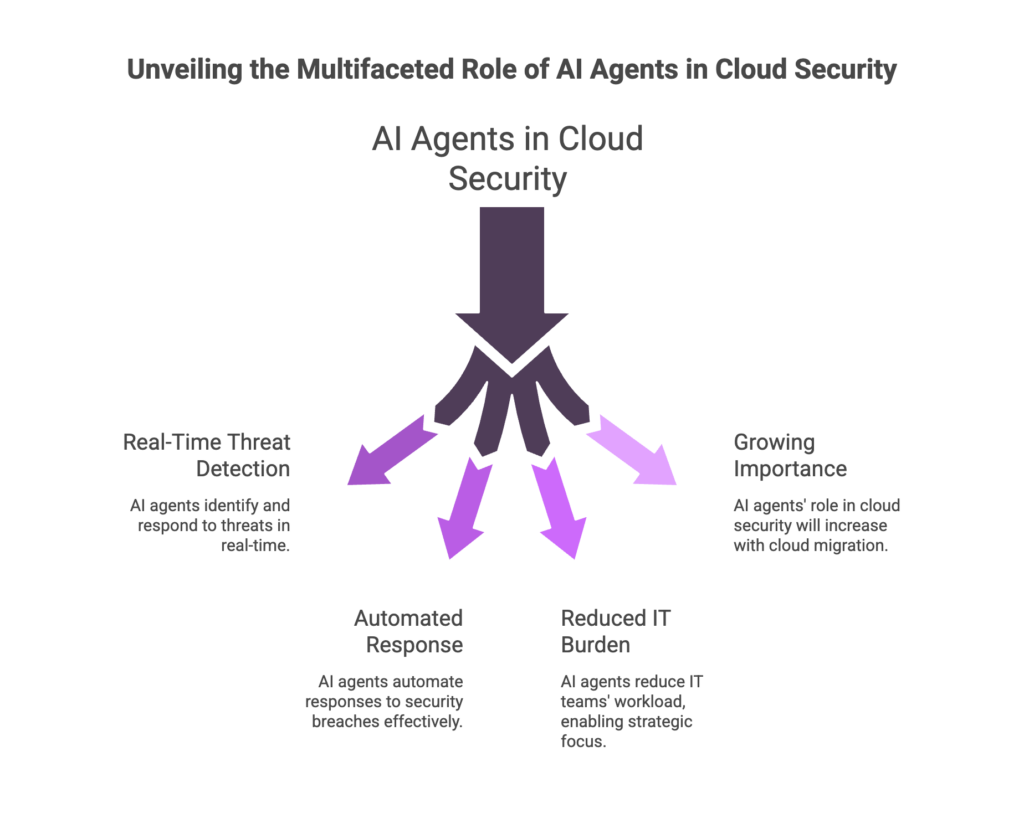
Beyond traditional tools, artificial intelligence (AI) and machine learning are increasingly useful in cloud security. AI agents can analyze vast amounts of cloud telemetry in real time, spot subtle threat patterns humans might miss, and even take automated actions. For example, an AI-powered system could automatically correlate logs from your Kubernetes cluster, network gateway, and identity service to detect a stealthy attack path. AI can also help prioritize alerts, reducing noise by flagging only the most critical incidents based on learned context.
Consider using AI-driven security solutions – like Hunto’s AI Autopilot – to make your defenses smarter. Hunto’s AI Autopilot can autonomously monitor your cloud environment 24/7, using machine learning to detect anomalies and potential breaches faster than manual methods. When it detects a threat (for instance, a rogue login or unusual data transfer), it can automatically initiate predefined responses such as isolating affected workloads, rotating exposed credentials, and notifying your security team with detailed insights. This kind of autonomous cloud security agent turns reactive security into proactive defense, freeing your team to focus on higher-level strategy.
- Employ AI-based monitoring tools to analyze complex logs and identify threats that follow no known signature.
- Use machine learning to reduce false positives and surface only high-risk incidents to your analysts.
- Automate response with AI agents: for example, have the system quarantine a compromised container automatically.
- Continuously train your AI models on new threat intelligence so they evolve alongside attacker tactics.
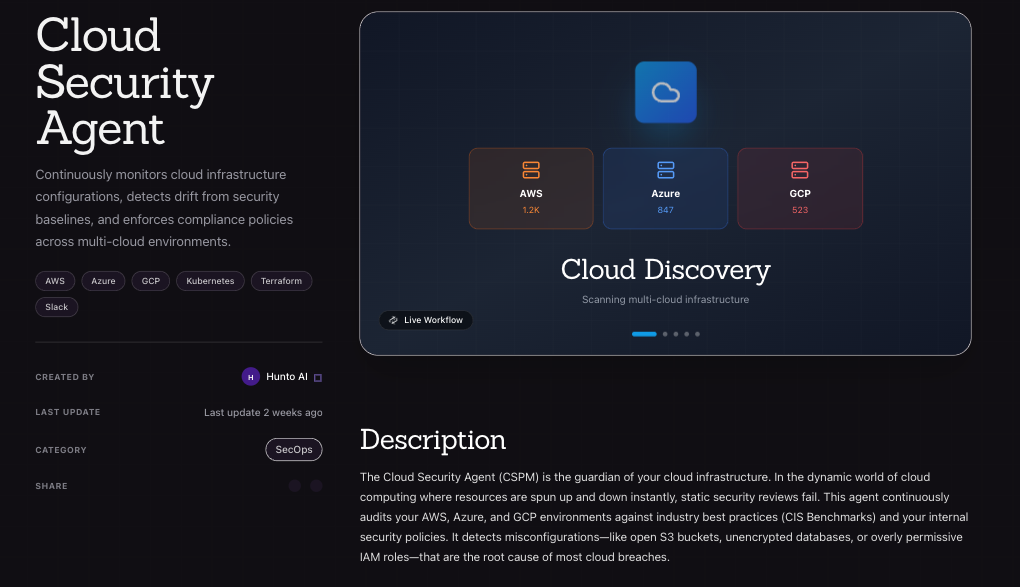
By integrating AI and automated agents like Hunto’s Autopilot into your cloud security, you enhance detection speed and response while reducing manual overhead. Think of AI as a force-multiplier that helps your security team keep pace with the sophisticated threats of 2026.
FAQs About Cloud Security Tips
Why is cloud security important for businesses today?
Cloud environments are now integral to business operations, hosting critical data and services. This means breaches or downtime in the cloud can have massive impacts – data loss, regulatory fines, and damaged reputation. Securing the cloud ensures that sensitive information stays protected and that your services remain available. Effective cloud security builds customer trust and keeps your business compliant and resilient against cyber threats.
What are the most common cloud security threats to watch for?
The biggest threats include misconfigurations (like open storage buckets), compromised credentials (leading to account hijacking), and malware attacks (such as cloud-targeted ransomware). Insider risks and shadow IT are also common, where employees inadvertently expose data. Distributed denial of service (DDoS) attacks and vulnerabilities in APIs or shared resources can disrupt cloud services. Adopting best practices (MFA, patching, monitoring) addresses most of these common threats.
How often should we review and update our cloud security measures?
Cloud security is not “set it and forget it.” Review your security posture continuously. Many organizations perform formal reviews quarterly or after any major change (like a big deployment). Continuous monitoring tools (CSPM, SIEM) help identify issues in real time. Additionally, update your security strategy whenever new threats emerge or when you adopt new cloud services. As a rule of thumb: annually review policies in depth, but perform automated compliance scans and audits at least monthly or per deployment.
What is Zero Trust, and do we really need it for cloud security?
Zero Trust is a security model based on “never trust, always verify.” In cloud terms, it means that every access request (to a cloud resource or API) is authenticated and authorized, regardless of whether the user is inside the network perimeter. This approach is highly valuable in the cloud because resources are often accessed from anywhere. Zero Trust reduces risk by continuously validating user identities, device health, and context for every request. It’s considered a best practice for modern cloud security, as it minimizes the impact if an attacker does breach your perimeter.
How can AI agents like Hunto’s Autopilot improve our cloud security?
AI agents can greatly enhance cloud defenses through continuous monitoring and rapid response. They use machine learning to spot complex attack patterns (for example, subtle credential abuse) more quickly than manual processes. Hunto’s Autopilot, for instance, can autonomously track your cloud’s behavior baselines and flag deviations in real time. It can also automate routine responses (quarantining a VM, rotating keys) without waiting for human intervention. By leveraging AI, your team can detect and contain threats faster, focusing human effort on strategic security improvements rather than on alert fatigue.


